Choosing POS software can become confusing when every platform presents a long list of features.
One system may focus on billing, another may highlight inventory, while another may offer different payment options or additional tools for managing sales. For a business owner, the useful question is not simply which system has the longest feature list. It is whether the software fits the way the business works every day.
For shops, cafés, and other businesses that handle regular product sales, a POS system may need to support several connected activities, including billing, product management, stock tracking, purchases, and payments.
Start With the Actual Business Workflow
Before comparing POS software, it helps to look at what happens during a normal working day.
A customer selects a product. The business needs to create a bill and record the payment. If the business sells physical products, that sale may also affect the available stock.
There can be other tasks around the transaction. Products may need to be added or updated, purchases may need to be recorded, and sales information may need to be reviewed later.
These everyday tasks are a better starting point than choosing software based only on the number of features advertised.
Billing Is More Than Creating a Bill
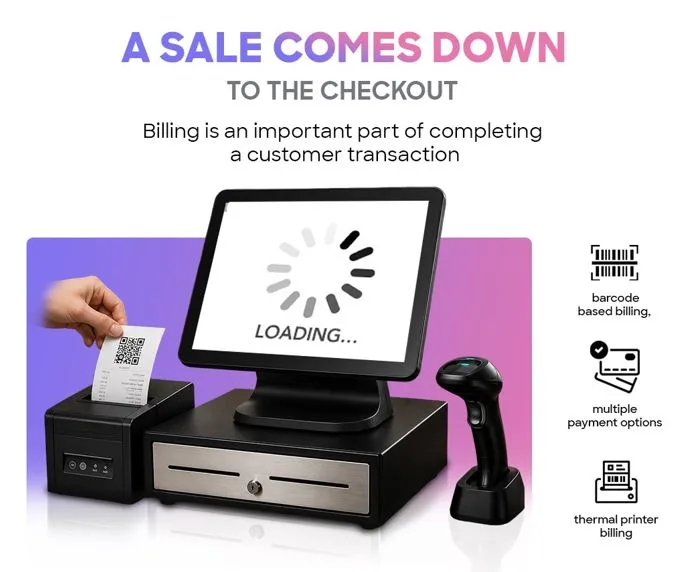
Billing is one of the main reasons businesses look at Point of Sale Software.
A POS system can provide a place to select products, calculate transactions, and record sales. Depending on the software, it may also connect billing with product and inventory information.
This can be useful for businesses that want their sales activity recorded digitally rather than maintaining separate manual records.
However, billing requirements are not the same for every business. A small shop with a limited product range may have different needs from a retailer handling a much larger catalogue.
Product Management Matters Too
A business cannot create accurate bills without keeping its product information organised.
Product management may include maintaining product names, prices, and other information required during sales. Some POS systems also provide different ways to search for products.
Sitedecode Smart POS, for example, lists product management and voice-based product search among its features. Its product page explains that users can add products by speaking their names through its voice detection functionality.
Whether this is useful depends on the business and how employees normally work with products.
Inventory and Billing Often Work Together
For businesses selling physical products, stock is an important part of the sales process.
When an item is sold, the business may want to know how much remains. Some POS solutions provide stock tracking and low-stock alerts to help businesses monitor this information.
Sitedecode lists real-time stock tracking and low-stock alerts as features of its Smart POS system.
These tools may be particularly relevant to businesses that handle multiple products and need to keep track of stock during regular operations.
Barcode Billing Can Be Useful for Product-Based Businesses
Businesses that use product barcodes may also want to consider barcode support when comparing POS software.
Instead of manually searching for every product during a transaction, barcode billing can help identify the item through its barcode.
The value of this feature depends on the business. A retailer using barcoded products may find it useful, while a business that does not use product barcodes may have little reason to prioritise it.
Sitedecode lists barcode billing as one of the features available with Smart POS.
Purchases Should Not Be Ignored
Sales are only one side of a product-based business.
Businesses also purchase products from suppliers, and those purchase activities need to be recorded. Purchase entry functionality can help maintain these records alongside other product-related information.
Sitedecode's Smart POS page lists purchase entry management among its available features.
When comparing POS software, it can therefore be useful to consider both sales and purchasing rather than looking at billing alone.
Payment Options Are Another Practical Consideration
The way a business accepts payments can also influence its choice of POS software.
A business may use more than one payment method, so it is worth checking what a particular system supports before making a decision.
Sitedecode lists multiple payment options as part of its Smart POS offering.
Rather than assuming that every POS system handles payments in the same way, businesses should compare the available options with their own requirements.
Is Online or Offline Use Important?
Internet connectivity is another factor worth considering.
Some POS solutions support both online and offline use. If a business operates in a situation where internet connectivity can be inconsistent, understanding the system's offline functionality may be important.
Sitedecode describes Smart POS as supporting online and offline use.
Businesses should still check how the specific offline workflow works before choosing any POS system, because offline capabilities can differ between software providers.
Looking at Sitedecode Smart POS as an Example
Sitedecode Smart POS is one example of a POS software solution that businesses can compare with other options.
Its listed features include product management, barcode billing, stock tracking, low-stock alerts, purchase entry management, multiple payment options, voice-based product search, and online/offline support. The product page also describes compatibility across mobile, tablet, and desktop devices.
These features may be relevant to some businesses, but that does not mean they will be equally useful to everyone.
The sensible approach is to compare the available functionality with the business's actual workflow.
Sitedecode Smart POS:
https://sitedecode.com/pos
Questions to Ask Before Choosing POS Software
Before selecting a POS system, a business can make the comparison easier by answering a few practical questions:
- How many products need to be managed?
- Does the business need stock tracking?
- Are barcodes used?
- How are purchases currently recorded?
- Which payment methods are required?
- Is offline use important?
- Which devices will employees use?
- What sales information needs to be reviewed?
The answers can help narrow down the features that actually matter.
Final Takeaway
Choosing POS software does not have to be about finding the system with the biggest feature list.
It can be more useful to begin with the business's daily workflow and then compare software based on the tasks that need to be handled.
Billing, product management, inventory, barcode support, purchasing, payments, and connectivity can all be relevant, but their importance depends on the individual business.
A practical comparison starts with those requirements. Once the needs are clear, it becomes easier to decide which POS software is worth considering.