A virtual data room can play an important role in transactions where multiple parties need to review sensitive business information. Mergers and acquisitions, fundraising, legal proceedings, audits, and other business activities can involve large collections of confidential documents.
When these documents are uploaded without a clear organizational system, reviewers may struggle to find the information they need. A carefully designed folder hierarchy can make the process easier by grouping related documents and creating a predictable path through the data.
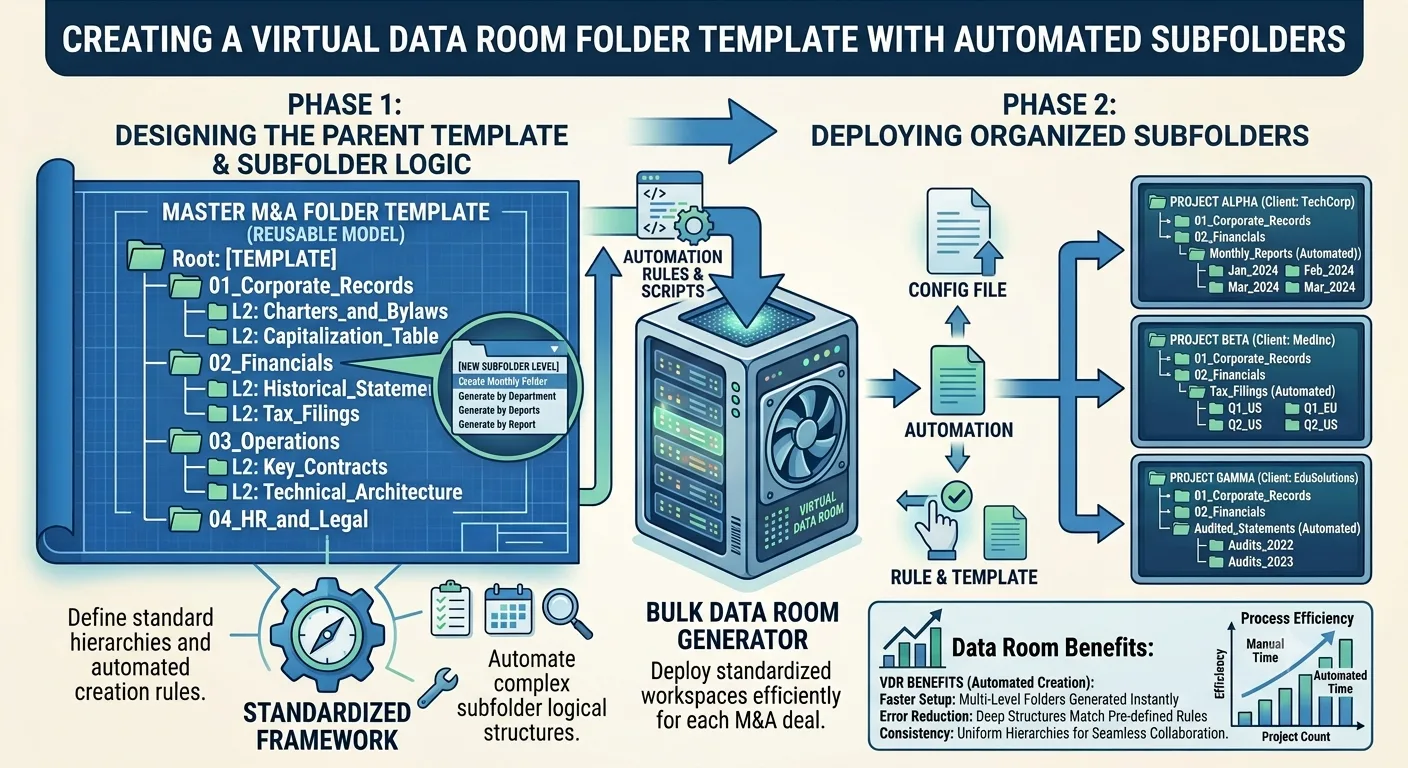
Using a virtual data room folder template can provide a consistent starting point for organizing transaction documents. When the structure contains multiple levels of folders and subfolders, automation can also reduce the amount of manual work required to prepare each new data room.
Why Data Room Organization Matters
A data room may contain financial statements, contracts, tax documents, employee information, intellectual property records, customer information, supplier agreements, insurance policies, and corporate records.
These documents can come from different departments and may cover several years.
Without a logical structure, a reviewer may have difficulty understanding where specific information belongs.
For example, a financial reviewer should be able to locate financial statements without searching through general corporate documents. Similarly, legal reviewers should have a clear route to contracts, litigation records, licenses, and other relevant information.
A well organized hierarchy provides that structure.
What Is a Virtual Data Room Folder Template?
A virtual data room folder template is a predefined organization system designed for storing transaction related documents.
A basic template might include:
- Corporate Information
- Financial Information
- Tax
- Legal
- Contracts
- Human Resources
- Intellectual Property
- Customers
- Suppliers
- Operations
- Technology
- Insurance
Each category can contain additional subfolders.
For example:
Corporate Information
- Company Formation
- Organizational Documents
- Board Records
- Shareholder Information
- Corporate Governance
The template does not need to be identical for every transaction. It can serve as a starting point that is adjusted according to the company and transaction requirements.
Why Templates Reduce Preparation Time
Preparing a data room from an empty workspace can take considerable effort.
Teams need to decide which categories to create, establish folder names, create subfolders, and ensure the hierarchy is consistent.
A reusable template eliminates much of this initial setup.
Once an organization has developed a structure that works well, it can reuse the same framework for future transactions.
This can be especially useful for investment firms, legal teams, financial advisers, consultants, and businesses that regularly participate in transactions.
Build the Main Categories First
A strong template begins with broad categories.
These categories should reflect the major areas of information that reviewers are likely to request.
For example, financial information could contain:
- Financial Statements
- Management Accounts
- Budgets
- Forecasts
- Accounts Receivable
- Accounts Payable
- Banking
- Financial Analysis
Legal information could include:
- Corporate Records
- Material Contracts
- Litigation
- Regulatory Matters
- Licenses
- Legal Correspondence
The structure should be detailed enough to make documents easy to locate but not so complicated that users become confused.
Create Logical Subfolder Levels
The next step is determining where subfolders are necessary.
A simple hierarchy might have only two levels:
Financial
→ Financial Statements
→ Budgets
→ Forecasts
A more detailed structure could contain three or four levels:
Financial
→ Financial Statements
→ 2024
→ Audited Statements
→ Financial Statements
→ 2025
→ Audited Statements
The appropriate level depends on the volume and complexity of the information.
Too few folders can result in overcrowding. Too many folders can make navigation difficult.
Create Subfolder Structure Automatically
When a data room contains a large hierarchy, manually building every level can become repetitive.
The ability to create subfolder structure automatically can simplify this process by allowing predefined relationships between folders to be generated systematically.
For example, a transaction may require the same structure under several business units:
- Business Unit A
- Financial
- Legal
- Operations
- Contracts
- Business Unit B
- Financial
- Legal
- Operations
- Contracts
Rather than manually creating each folder and subfolder, an automated process can reproduce the defined structure.
This can save time and improve consistency.
Use Standard Naming Rules
Folder names should follow a consistent naming system throughout the data room.
Avoid mixing different terms for the same category.
For example, if one section uses "Employment Agreements," another should not use "Employee Contracts" unless the two categories have different purposes.
Consistent names make the structure easier to understand.
It can also help when several people contribute documents to the same data room.
Organize Documents by Information Type
The folder structure should reflect how reviewers expect to find information.
For example, contracts could be organized by category:
Contracts
- Customer Contracts
- Supplier Contracts
- Employment Agreements
- Partnership Agreements
- Lease Agreements
This is generally easier to navigate than placing all contracts in one large folder.
However, the best arrangement depends on the transaction and the volume of documents.
Consider Date Based Organization
Historical documents often require additional organization.
Financial records, board documents, contracts, and other materials may cover multiple years.
In these situations, year based subfolders can make navigation easier.
For example:
Financial Statements
- 2024
- 2025
- 2026
Alternatively, organizations may organize documents by reporting period or document type.
The important factor is consistency.
Keep Confidential Information Protected
Organization and security should be considered together.
A data room can contain sensitive business information that should not be accessible to every participant.
Before creating a large folder structure, determine which categories require restricted access.
For example, employee information may require different permissions from general marketing materials.
A well designed structure should make it easier to apply and review access policies.
Avoid Overcomplicating the Template
A common mistake when designing data room structures is creating too many folders.
A template should make information easier to find, not create additional navigation problems.
Before adding a new folder, ask whether it serves a meaningful purpose.
If a category is likely to contain only one or two documents, it may not need its own dedicated folder.
Simple structures are often easier for external reviewers to understand.
Use a Standard Structure Across Transactions
Organizations that participate in multiple transactions can benefit from maintaining a master template.
The master version can contain the most commonly required categories.
For each new transaction, the team can copy or generate the basic structure and then modify it.
This approach provides consistency while still allowing flexibility.
Over time, feedback from previous transactions can be used to improve the template.
Review the Template Regularly
Business requirements change, and data room structures should evolve accordingly.
After completing a transaction, review the folder structure.
Identify categories that were frequently requested but missing from the template. Remove sections that were unnecessary. Consider whether reviewers had difficulty finding particular types of documents.
This feedback can help improve the template for the next transaction.
Automation Can Support Larger Data Rooms
The larger the transaction, the more valuable an automated setup process can become.
A complex data room may contain hundreds of folders and subfolders. Creating these manually increases the amount of preparation work and creates opportunities for inconsistencies.
Automation can reproduce predefined structures quickly while allowing teams to focus on collecting, reviewing, and organizing the actual documents.
This is particularly helpful when several data rooms need to be prepared using similar structures.
Prepare Before Uploading Documents
Folder creation should ideally happen before the majority of documents are uploaded.
If documents are uploaded first and the structure is created later, teams may need to move large numbers of files into their appropriate locations.
Creating the hierarchy in advance provides a destination for each document.
Employees can then place information directly into the appropriate category as they prepare the data room.
Make the Reviewer's Experience the Priority
A data room exists partly to help other parties review information efficiently.
The person who created the folder structure may understand the company's internal terminology, but an external reviewer may not.
Use clear names and logical categories that make sense to someone unfamiliar with the organization.
A reviewer should be able to predict where information is likely to be stored.
This simple principle can improve the usability of the entire data room.
Final Thoughts
A well designed data room can make complex document review more manageable. The foundation is a clear hierarchy that organizes information according to logical categories and provides a predictable path to specific documents.
A virtual data room folder template gives organizations a reusable framework for creating that hierarchy. It can save preparation time, improve consistency, and provide a starting point for different types of transactions.
For larger or more complex structures, the ability to create subfolder structure automatically can further reduce repetitive setup work. Instead of manually building every level of the hierarchy, teams can establish the structure once and reproduce it when needed.
The most effective approach combines a simple and logical template with consistent naming, appropriate security controls, careful document preparation, and periodic reviews.
A data room should ultimately make information easier to understand and access. By treating folder organization as an important part of transaction preparation rather than an afterthought, businesses can create a more efficient environment for due diligence and document review.