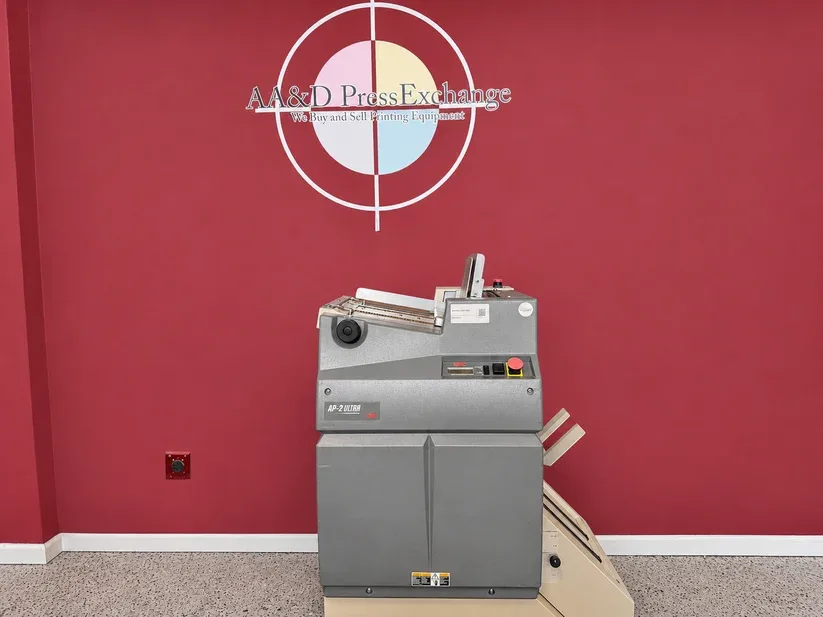
Producing professional bound documents involves more than printing pages and adding a cover. Before sheets can be assembled with plastic combs, wire binding, or coil spines, they often need accurately positioned holes along one edge. When a print shop handles hundreds or thousands of sheets, completing this task manually can consume valuable time and slow down the entire finishing department.
The GBC AP-2 Ultra Punch is an automatic paper punching machine designed to make this part of the process faster and more manageable. It feeds individual sheets, punches them according to a selected pattern, and collects the finished sheets in an output stacker. Its interchangeable dies allow businesses to prepare documents for different binding styles without needing a separate punching machine for every format.
For commercial printers, copy shops, and businesses producing large quantities of manuals, reports, and presentations, the AP-2 Ultra offers a way to handle repetitive punching work more efficiently. Its ability to process different paper stocks, index tabs, and covers also makes it useful for varied production requirements.
This article looks at how the GBC AP-2 Ultra works, the features that support its performance, the types of documents it can prepare, and what buyers should examine when considering a used machine.
What Is the GBC AP-2 Ultra Punch?
The GBC AP-2 Ultra is an automatic paper punching machine used in document finishing. Its main purpose is to create a consistent row of holes along the edge of printed sheets so they can be assembled using a compatible binding system.
Think about a training manual with dozens of pages. If the manual uses plastic comb binding, every page needs a matching row of holes. Those holes must be positioned correctly so the sheets fit onto the comb and turn easily when someone reads the document.
The AP-2 Ultra automates the punching stage. Instead of an operator placing each sheet into a small manual punch, the machine uses a feeding system to move sheets through the punching mechanism.
One of its important advantages is its interchangeable die system. A die is the component that determines the hole pattern. Changing the die allows the same machine to prepare sheets for different binding methods, such as plastic comb, wire, or plastic coil binding.
This flexibility makes the AP-2 Ultra suitable for print businesses that produce different document formats throughout the working week.
How Does the AP-2 Ultra Work?
The machine follows a straightforward process: sheets are loaded, separated, aligned, punched, and collected.
Loading the Paper
The operator places a prepared stack of printed sheets into the feed hopper. The machine is designed to accommodate a range of paper sizes and stocks, including certain coated, glossy, laminated, and heavier materials.
The feed hopper can hold approximately 2,500 sheets of standard 80 gsm paper or an equivalent stack, depending on the stock being used. This capacity allows the operator to load a substantial quantity before needing to replenish the supply.
The paper must be prepared correctly before loading. Sheets should be in the right order, free from unwanted folds, and suitable for the selected punching setup.
Separating and Feeding Individual Sheets
Once the machine starts, its adjustable pick feeder separates sheets from the stack and moves them towards the punching area.
This is an important part of the process. Imagine dealing a deck of cards: each card needs to move forward separately rather than two or three sticking together. The AP-2 Ultra's feeding system is designed to handle sheets individually so that the punching process can continue smoothly.
The adjustable feeder helps accommodate different paper characteristics. This is particularly useful when switching between lighter paper, heavier stock, or printed sheets with different surface finishes.
Aligning and Punching the Sheets
Before a sheet reaches the punching mechanism, it needs to be positioned correctly. The machine uses adjustable guides to help align the paper.
The selected die determines where the holes are made and what shape they take. Once the sheet reaches the punching position, the machine creates the required pattern.
This process repeats as additional sheets are fed through the machine. The result is a stack of punched sheets ready for the next stage of binding.
Collecting the Finished Sheets
After punching, sheets move into the output stacker. The AP-2 Ultra is designed to maintain the order of the job without requiring a separate turnover device.
Keeping sheets in their original sequence is important when preparing multi-page documents. If pages become mixed up, the operator may have to spend additional time sorting them before binding.
The machine's feeding and collection arrangement helps maintain a more organised workflow from beginning to end.
Interchangeable Dies: One Machine, Multiple Binding Styles
A major reason businesses consider the AP-2 Ultra is its ability to work with different punching patterns.
The interchangeable die is the part that gives the machine its flexibility. Rather than purchasing a separate punch for each binding format, a business can install a compatible die for the required job.
Common options include:
- Plastic comb binding: Creates holes designed for plastic comb spines, commonly used for reports, workbooks, and training manuals.
- Wire binding: Produces patterns suitable for wire spines, which are often selected for presentations, calendars, and professional documents.
- Plastic coil binding: Makes holes that accommodate spiral plastic coils, allowing pages to turn around the spine.
- Loose-leaf punching: Creates standard holes for documents intended to be stored in ring binders.
- ProClick binding: Uses a specific hole pattern designed for GBC ProClick binding systems.
The availability of a particular pattern depends on the compatible die set. Buyers should confirm which dies are included with a machine and whether additional sets are available.
Changing Dies Without Special Tools
The AP-2 Ultra uses a removable die system designed for quick changes without requiring special tools. This is useful when a print shop moves from one binding style to another.
For example, a morning order may require plastic comb binding, while an afternoon job needs wire-bound presentation documents. Instead of changing the entire machine, the operator can install the appropriate compatible die and adjust the setup.
The dies also have removable punch pins. These can provide flexibility when adapting the punching pattern to different sheet requirements, provided the selected configuration supports the intended job.
Some versions and equipment listings refer to as many as 14 available punch patterns. The exact range should be checked against the compatible dies available for the particular machine.
Features That Help Manage Different Paper Types
Adjustable Pick Feeder
Paper does not always behave in the same way. A lightweight sheet may feed differently from a thick cover, while coated or laminated stock can present its own handling challenges.
The AP-2 Ultra includes an adjustable pick feeder to help operators work with different paper types. Adjustments can be made to suit the stock being processed, helping the machine separate and feed sheets more reliably.
This is valuable for print shops that handle more than one standard paper weight.
Variable Speed Control
Not every material should be processed at the same speed. A straightforward job using standard paper may allow faster operation, while a more challenging stock may require a slower setting.
The machine provides variable speed control through its electronic control panel. Operators can select a suitable speed for the job rather than relying on one fixed production setting.
This gives the business greater control when changing between materials and document formats.
Electronic Curl Adjustment
Printed sheets can sometimes develop a curve or curl, particularly after passing through printing or finishing equipment.
A curled sheet may not travel through a feeder as smoothly as a flat one. It can cause alignment problems or interrupt the feeding process.
The AP-2 Ultra includes an electronic adjustment for heavily curled stock. This helps operators adapt the machine to sheets that need additional attention during feeding.
It does not mean every curled sheet can be processed without difficulty. Paper condition, storage, humidity, and the degree of curl still matter.
LCD Status Display
The machine includes an LCD display that communicates its operating status. This gives the operator information about the machine while a job is running or being prepared.
A clear status display can make daily operation easier because the user does not have to rely entirely on guesswork when checking the machine's condition.
Operator-Friendly Loading and Unloading
The AP-2 Ultra is designed so that operators can load incoming paper and remove punched sheets from the same working position.
This arrangement can reduce unnecessary movement around the machine. It also makes it easier to manage the flow of paper during longer production runs.
The separate feed hopper and output stacker support continued loading and unloading without requiring the operator to stop after every small batch.
How Fast Can the GBC AP-2 Ultra Punch?
Production speed is one of the most important considerations when choosing an automatic punch.
The AP-2 Ultra is specified for speeds of up to 56,000 sheets per hour. The manufacturer's brochure also gives an average production figure of approximately 40,000 sheets per hour. These figures represent different operating conditions, and actual output depends on the paper, die pattern, setup, and job requirements.
A useful way to understand the benefit is to compare a large punching order with manual processing. If an operator has to position and punch every sheet individually, the work can become repetitive and time-consuming. An automatic feeder handles the repeated movement of sheets, allowing the operator to concentrate on monitoring the job and preparing the next batch.
The machine's separate loading and output areas also help keep the process moving. An operator can manage incoming paper and collect completed sheets without repeatedly interrupting the punching cycle.
However, the highest advertised speed should not be treated as a guaranteed everyday output. More complex stocks, frequent adjustments, and different die patterns can affect production.
What Types of Jobs Can It Handle?
The AP-2 Ultra is suitable for businesses producing a range of punched and bound documents. Its different die options make it useful across several commercial and office-related applications.
Some common examples include:
- Training manuals: Prepare large quantities of employee guides, course materials, and instructional documents.
- Business proposals: Punch presentation documents that will be assembled into a professional bound format.
- Financial reports: Prepare reports and supporting pages for comb, wire, or other compatible binding systems.
- Product catalogues: Punch printed catalogue pages and covers for assembly into finished publications.
- Presentations and portfolios: Create organised document sets for meetings, client presentations, and project reviews.
- Handbooks: Prepare employee handbooks, reference guides, and operational documents.
- Legal documents: Punch suitable paperwork for storage in loose-leaf folders or binders.
- Index-tab documents: Process jobs containing tabbed sheets alongside regular pages, where the material and setup are compatible.
The machine is particularly useful when a business receives orders with different page sizes, binding formats, and paper finishes.
Paper Sizes and Material Compatibility
The AP-2 Ultra is designed to work with a range of sheet dimensions. Its published brochure specifies a punched-edge range of approximately 139 mm to 304 mm and an unpunched-edge range of approximately 139 mm to 298 mm.
It is also specified for paper stocks ranging from 70 gsm to 300 gsm, including index tabs and colour copier paper. This gives it the flexibility to handle more than ordinary office paper.
For example, a print shop may need to punch standard text pages, thicker presentation covers, or a set of tabbed training materials. The machine's adjustable feeding and alignment features help accommodate these different requirements.
Nevertheless, the paper's thickness, surface, stiffness, and condition can influence how it feeds. Before committing to a large job, operators should test unfamiliar materials and use the recommended settings.
What to Consider Before Buying a Used AP-2 Ultra
A used automatic punch can be a useful addition to a finishing department, but its condition should be evaluated carefully. The machine's advertised speed and features do not tell the full story about how a particular unit has been maintained.
Check the Feeding Mechanism
Ask the seller to demonstrate the machine with a stack of paper. Watch whether sheets feed individually and consistently.
Pay attention to double-feeding, missed sheets, skewed paper, or frequent interruptions. These problems can affect production and may indicate that the feeder needs adjustment or servicing.
Inspect the Punching Area
The punching mechanism should operate smoothly and produce clean, consistent holes.
Request a sample using the die that you intend to use most often. Examine the punched sheets for uneven holes, incomplete cuts, rough edges, or misalignment.
A test with your own paper stock can be particularly helpful because different materials may behave differently.
Confirm Which Dies Are Included
Do not assume that a used AP-2 Ultra comes with every available die pattern. Some machines are sold without a die, while others include one or more sets.
Ask for a clear list of the included dies and check their condition. If you need a specific binding format, confirm that the matching die is available and compatible with the machine.
Test the Controls and Display
The electronic controls and LCD display are important parts of daily operation. Check that the display is readable, buttons respond correctly, and speed adjustments work as expected.
Ask the seller whether the machine has experienced recurring faults or required recent electrical repairs.
Review Safety Features
The machine includes safety-related controls and protective arrangements. Make sure the safety shield and emergency stop function correctly during a demonstration.
Never bypass guards or operate the equipment with safety components removed. Any damaged or missing protective part should be addressed before the machine returns to production.
Verify Electrical Requirements and Installation Space
Electrical specifications can differ between market versions. The manufacturer's brochure lists a 240V, 50–60Hz, 12-amp supply, while some North American listings describe 115V configurations.
Check the identification plate on the actual machine rather than assuming that every AP-2 Ultra has the same electrical requirements.
The brochure lists approximate dimensions of 863 mm wide, 1,346 mm high, and 635 mm deep, with a weight of around 136 kg. Make sure the delivery route and intended operating area can accommodate the machine safely.
Is the GBC AP-2 Ultra Right for Your Business?
The AP-2 Ultra may be a strong option for print businesses that regularly process large quantities of punched sheets and work with multiple binding formats.
A commercial printer producing reports, catalogues, and training materials may benefit from the machine's automatic feeding and interchangeable dies. A copy shop handling frequent binding orders may value the ability to switch between punching patterns without replacing the complete machine.
Businesses should also consider the volume of work they expect to process. If punching is only an occasional requirement, a smaller machine may be sufficient. For high-volume production, the AP-2 Ultra's feeding capacity and speed may offer more practical value.
Before purchasing, compare the machine's condition, included dies, service history, electrical configuration, and availability of replacement parts. These details can be just as important as the advertised production rate.
Explore Used Finishing Equipment on MyPrintListings
Finding the right finishing machine often involves comparing different models, checking available accessories, and assessing the condition of used equipment. A specialised platform can make that research more focused by bringing industry-related listings together.
MyPrintListings – Printing, Bindery & Finishing Equipment Marketplace with No Sales Commissions connects buyers and sellers across the printing equipment industry. Businesses can explore machinery in different categories, including printing, bindery, and finishing equipment.
If you are looking for a GBC AP-2 Ultra Punch, a dedicated Printing Equipment Marketplace can help you discover available listings and connect with sellers. When comparing machines, pay close attention to the included die sets, operating condition, paper-handling performance, and electrical requirements.
For sellers, listing specialised finishing machinery can help put equipment in front of buyers who are actively searching within the printing industry.
Conclusion
The GBC AP-2 Ultra Punch is designed to simplify a repetitive but essential part of document finishing. Its automatic feeding system, interchangeable punching dies, adjustable speed, and ability to handle different paper stocks make it a versatile option for businesses producing bound documents in larger quantities.
Its high stated production capacity can support demanding workloads, while the range of compatible punching patterns gives print shops flexibility across different binding styles. Features such as the LCD display, electronic curl adjustment, and same-position loading and unloading also help organise everyday operation.
For buyers considering a used unit, a practical demonstration is essential. Test the feeding system, inspect the punching results, confirm the included dies, and verify the machine's electrical requirements.
When matched to the right production environment, the AP-2 Ultra can help a print business prepare documents more efficiently and keep its finishing workflow moving.