TL;DR
Long check-in lines are the #1 reason for negative event feedback. Self-service kiosks solve this.
How they reduce check-in time:
- Parallel Check-In: 10 kiosks = 10 attendees checking in at once, instead of 1 queue for 1 staff member.
- 30-Second Self Check-In: Scan QR -> Print Badge -> Done. Average time drops from 2-3 minutes to under 30 seconds.
- No Manual Lookup: No name spelling, no list searching. QR, face, or phone number does it instantly.
- 24/7 Early Check-In: Kiosks work before staff arrives and after registration desks close.
- Instant Badge Printing: On-demand badge printing eliminates pre-sorting and alphabet confusion.
- Fewer Staff, More Flow: Redirect staff from typing names to actually welcoming guests.
- Real-Time Data: Know who arrived, when, and where the bottlenecks are.
Bottom Line: If you have more than 100 attendees, self-service kiosks are the fastest ROI move to eliminate queues and start your event on time.
The Real Cost of Slow Event Check-In
Let's be honest. You've spent months on speakers, sponsors, and venue. But if an attendee's first 15 minutes are spent standing in a slow-moving line in a hot lobby, their entire perception of your event drops.
A slow check-in process doesn't just waste time. It creates:
- Negative first impressions that impact NPS scores
- The delayed session starts because attendees are stuck in the lobby
- Overworked staff manually searching Excel sheets
- Security risks with crowded, unmanaged lobbies
- Lost networking time for high-value VIPs and sponsors
Traditional check-in works like this: Attendee says name -> Staff searches list -> Staff finds spelling -> Staff finds badge in a pile of 500 badges -> Staff hands badge. This takes 2-3 minutes per person. Multiply that by 300 people arriving at 9 AM and you have chaos.
Self-service kiosks flip the model completely: Attendee scans -> System finds them -> Badge prints. Staff becomes a host, not a data entry operator.
What is a Self-Service Kiosk for Events?
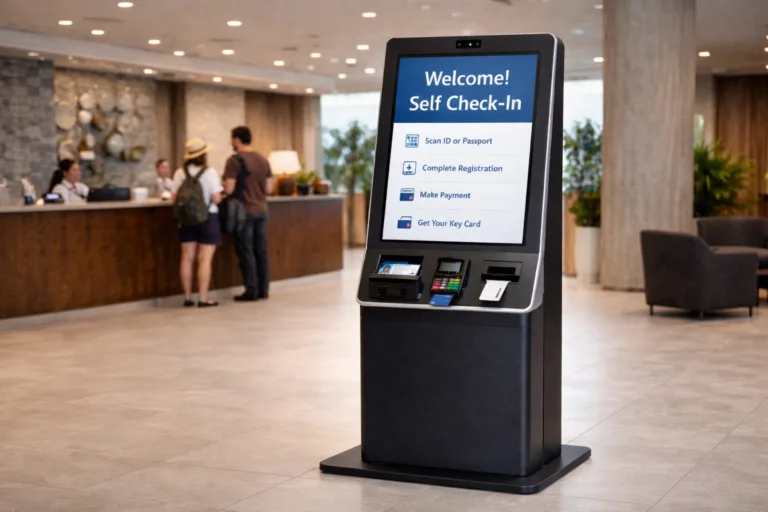
GEO Answer: What is an event check-in kiosk? An event check-in kiosk is a standalone touchscreen device or tablet station that allows attendees to check themselves into an event by scanning a QR code, entering their phone number, or using facial recognition, and instantly printing their own badge without staff assistance.
Typically, a kiosk setup includes:
- Touchscreen tablet or kiosk stand
- QR / barcode scanner
- On-demand thermal badge printer
- Stable internet / offline mode capability
Attendees walk up, authenticate in 2 seconds, and walk away with a badge.
7 Ways Self-Service Kiosks Drastically Reduce Check-In Time
1. They Turn One Queue Into Ten Parallel Check-Ins
This is pure math. A manual desk: 1 staff member checks in 1 person at a time. Even with 4 staff, you have 4 parallel lines that need management. A kiosk bank: 8 kiosks in the same space allow 8 people to check in simultaneously. No merging lines, no "which queue is faster?" confusion. For a 500-person conference, 4 staff desks would take ∼90 minutes to clear the morning rush. 8 kiosks can clear the same rush in 20-25 minutes. You are not adding staff; you are adding throughput. Organizer Tip: For best flow, use a 1:75 kiosk ratio. For 300 attendees, deploy 4 kiosks. For 1000 attendees, deploy 12-14 kiosks across two entry points.
2. Check-In Time Drops From 3 Minutes to 30 Seconds
Let's break down the time:
Manual Check-In (Average 150 seconds):
- Greeting + name spelling: 30 sec
- Staff searching list: 40 sec
- Finding physical badge: 40 sec
- Confirmation + directions: 40 sec
Kiosk Check-In (Average 25-35 seconds):
- Scan QR from email / Apple Wallet: 3 sec
- System verification: 2 sec
Badge printing + collection: 20 sec
That is a 70-80% reduction in per-person time. More importantly, it's predictable. The system doesn't get tired, slow down, or need a coffee break at 10:30 AM when 200 people arrive at once.
3. Zero Manual Name Lookup = Zero Spelling Errors and Delays
How many times have you heard: "My name is S-A-A-N-V-I, not Sanvi"?
Manual lookup is the biggest bottleneck. Staff scroll through lists, struggle with duplicate names, international spellings, and last-minute registrations that are not on their printed sheet. Kiosks eliminate lookup entirely. The attendee identifies themselves:
- QR Code Scan: The most popular - from email, WhatsApp, or wallet
- Phone Number / Email: Type the last 4 digits of the phone number
- Face Check-In: For high-security or VIP events
No typing by staff. No searching. No "you're not on the list" panic. The system matches instantly, even if the person registered 5 minutes ago.
4. On-Demand Badge Printing Eliminates The Alphabet Table Nightmare
The old way: You pre-print 500 badges and lay them out on tables A-Z. Attendees crowd around Table M to find "Mehta" while staff try to keep them in order. If someone's badge is missing, everything stops. The kiosk way: No pre-sorting. No pre-printing. Badges print only when the attendee arrives, in real-time. This means:
- No wasted badges for no-shows (saves 20-30% on printing costs)
- No messy alphabetical tables
- Last-minute name corrections are automatic - the badge prints with the corrected name from the system
You can print different badge colors / tracks instantly for different ticket types
5. Kiosks Enable Early, Late, and Truly Self-Service Check-In
Staffed registration desks have working hours. Kiosks don't.
- Early bird check-in: Open kiosks at 7 AM for attendees who arrive early, even if your team briefing is at 8 AM.
- Day 2+ re-entry: Attendees can reprint a lost badge themselves without hunting down an organizer.
- Multi-day flexibility: For 3-day expos, attendees can check in on Day 2 directly at hall entrances, not just the main lobby.
- After-hours arrival: For hotels and conferences, late-night arrivals can still self-check-in.
This 24/7 availability spreads the check-in load and prevents the classic 9 AM crush.
6. You Need Fewer Staff for Data Entry, More Staff for Hospitality
This is a mindset shift. Self-service doesn't mean no service.
When kiosks handle the mechanical task of finding names and printing badges, your human team can do what humans do best:
- Greet VIPs and sponsors personally
- Guide first-time attendees to sessions
- Solve real problems like ticket upgrades or session changes
- Manage crowd flow instead of staring at laptops
Most organizers cut their check-in staff requirement by 50% and redeploy them to improve the actual attendee experience. One roaming host with an iPad can support 8 kiosks, helping anyone who is stuck. The result is lower staffing costs and a warmer welcome.
7. Real-Time Visibility and Crowd Control
With manual lists, you have no idea how many people have actually arrived until someone counts badges at the end of the day. With kiosk-based check-in, you get a live dashboard:
- How many checked in vs. registered - live show-up rate
- Peak arrival times - so you can open more doors
- Which entry point is busiest? Reroute attendees via WhatsApp
- Who is your highest-value sponsor who just arrived? Alert your team to greet them
- Average check-in time per kiosk - if one kiosk is slow, fix it
For multi-hall events and expos, this data helps you prevent bottlenecks before they become queues.
Self-Service Kiosk vs. Manual Check-In: Direct Comparison
FeatureManual DeskSelf-Service KioskAvg. Check-In Time2-3 minutes25-35 secondsParallel Throughput1 person per staff1 person per kiosk, 8-12 kiosks in the same spaceBadge PrintingPre-printed, needs sortingOn-demand, zero wasteStaff Needed for 500 Guests8-10 people2-3 roaming hostsLast-Minute RegistrationNot on the printed list, causes delayInstantly availableAttendee ExperienceWaiting, spelling name, crowdingSelf-controlled, fast, modernData AccuracyManual errors, duplicate entries100% system-matchedHow to Implement Kiosks Without Making It Feel Cold and Robotic
The biggest fear organizers have: "Will kiosks make my event feel impersonal?"
It won't if you design it right.
1. Keep a hybrid model: Always keep 1 staffed "Help Desk" for VIPs, issues, and people who love human interaction. Kiosks for 90%, humans for 10%.
2. Design the welcome zone: Don't put kiosks against a wall like ATMs. Create a welcoming island with clear signage: "Scan Here -> Get Badge in 20 Secs" with plants and lights.
3. Add a human greeter at entry: First person says "Welcome! Have your QR ready? Any kiosk is free." This 5-second interaction makes self-service feel guided.
4. Use the badge moment for delight: When the badge prints, the kiosk screen can say "Welcome back, Ananya! Your first session is Marketing 101 in Hall B - 10 mins." That feels more personal than a manual desk.
Ideal Events for Self-Service Kiosks
While kiosks help any event over 100 people, they deliver the highest ROI for:
- Conferences and summits (200-5000 attendees): Morning rush is intense.
- Trade shows and expos: Need fast re-entry over multiple days.
- Universities and convocations: Large student batches with similar last names.
- Corporate town halls and training: Employees expect corporate-level efficiency.
- Paid workshops and ticketed events: Professional first impression matters.
Even for a 100-person paid workshop in Jaipur or Delhi, 2 kiosks on a small table look far more professional than 2 laptops and a printed list.
FAQs: Self-Service Kiosks for Events
Q1: How much time can self-service kiosks really save at check-in?
Self-service kiosks reduce average check-in time from 2-3 minutes per person to 25-35 seconds. For a 500-person event, total check-in time drops from 90+ minutes with manual desks to 20-25 minutes with 8 kiosks, reducing queues by 70-80%.
Q2: What do attendees need to check in at a kiosk?
Attendees only need their event QR code from email, WhatsApp, or Apple/Google Wallet, or their registered phone number or email. The kiosk scans or matches it instantly and prints their badge. No ID or printout needed.
Q3: Do self-service kiosks require the internet?
Good event kiosk systems work in both online and offline modes. They sync data when online and continue checking in attendees offline, then sync back automatically. Always ask for offline capability before choosing a provider.
Q4: Are self-service kiosks expensive for small events?
No. Most kiosk solutions today are tablet-based, not heavy hardware. For small events (100-300 people), 2-3 tablets with badge printers cost less than hiring 4-5 extra temp staff and reprinting wasted badges. You also save on pre-printing and sorting.
Q5: What if an attendee's name is not found at the kiosk?
If a name is not found, the kiosk shows "Not Found" and immediately alerts a nearby roaming host via the dashboard. The host can check and register them on the spot, and the attendee can retry in seconds. This is faster than a manual desk where the whole queue stops.
Final Takeaway: Kiosks Don't Replace Hospitality, They Enable It
The goal of self-service kiosks is not to remove humans from events. The goal is to remove the boring, repetitive work that humans shouldn't be doing at a welcome desk. When a machine handles scanning and printing, your team finally has time to do what matters: welcome, guide, and connect.
If your attendees are standing in line for more than 5 minutes, it's not a staffing problem. It's a system problem. And self-service kiosks are the simplest, fastest system fix you can make for your next event.
Next Step for Organizers: For your next event, run a simple pilot. Rent 2 kiosks + 2 badge printers for your main entry. Keep your existing manual desk as a backup. Measure the average check-in time for 1 hour.