Losing an iPhone can quickly turn into a confusing situation. You may have the device's IMEI number and assume that entering it into an IMEI tracker will reveal where the phone is. Unfortunately, that is not how IMEI technology works for ordinary users.
An IMEI, short for International Mobile Equipment Identity, is a unique identifier associated with a mobile device. It can help distinguish one handset from another and can be useful when a phone is reported missing, stolen, blocked, or checked before purchase. However, having an IMEI number does not automatically give you access to the iPhone's current GPS position.
If your iPhone is missing, Apple's Find My system is usually much more relevant for locating the device. The IMEI becomes particularly useful when you need to report the phone, contact your carrier, provide identification to authorities, or use an official device-blocking service.
This guide explains what really happens when you try to use an IMEI to find an iPhone, what legitimate IMEI services can provide, what they cannot provide, and what you should do instead if your phone has disappeared.
Can You Track an iPhone Using an IMEI Number?
Not in the way many websites make it sound.
An IMEI is essentially a device identification number. It isn't a public location code. You cannot normally take a 15-digit IMEI, type it into a website, and receive a live map showing where an iPhone is located.
This is one of the biggest misunderstandings surrounding IMEI tracking.
Some websites advertise services that sound like "find any phone by IMEI." Before trusting such a service, look carefully at what it actually provides. An IMEI lookup may return information about a device, but that is very different from obtaining its real-time location.
What an IMEI is useful for
Your iPhone's IMEI can have several practical uses:
- Identifying the exact cellular device
- Reporting a lost or stolen handset
- Helping a carrier identify or block a device
- Checking certain blacklist or device-status information
- Providing identification details to law enforcement
- Checking a second-hand iPhone before purchasing it
The IMEI therefore has an important role in lost-phone recovery, but it is normally one part of the process rather than the tracking method itself.
What an IMEI cannot normally provide
An IMEI number by itself does not normally give a regular user:
- A live GPS position
- The phone owner's address
- Access to the owner's Apple Account
- The iPhone's passcode
- A way to defeat Activation Lock
- A method for remotely controlling the device
- A live map through a random public website
So, if a website claims that entering an IMEI will immediately reveal the exact location of an iPhone, be cautious.
IMEI Tracker vs Find My: Which One Should You Use?
The answer depends on what you are trying to accomplish.
If your iPhone is missing and you want to locate your own device, Find My should normally be your first choice. If you need to identify, report, block, or verify a device, the IMEI can become important.
PurposeIMEIFind MyIdentifies the handsetYesYesHelps locate your iPhoneNot directlyYes, when location data is availableLost ModeNoYesPlay a soundNoYesRemote eraseNoYesDevice blockingCan helpNoPolice/carrier identificationYesCan helpPublic live trackingNoNoA simple way to understand the difference is:
IMEI tells systems which device they are dealing with.
Find My helps you locate and protect your Apple device.
They are complementary technologies, not substitutes for each other.
How to Find a Lost iPhone With Find My
If Find My was already enabled on the iPhone before it went missing, use it before experimenting with third-party tracking websites.
Step 1: Sign in to Find My
You can use another Apple device associated with your Apple Account or use Apple's Find Devices service online.
Once you are signed in, look for the missing iPhone in your device list.
Step 2: Check the available location
If the device can provide a location, Find My may show it on a map.
The result can depend on factors such as the phone's connection, battery status, and the availability of location information. You may see its current location or information about its most recent known location.
Don't assume that a location shown on a map always means the phone is physically sitting there at that exact moment.
Step 3: Play a sound when appropriate
If you think the iPhone is nearby—for example, somewhere inside your home, car, office, or a hotel room—using the sound feature can be more useful than checking the map repeatedly.
The sound can help you identify the device even when it is difficult to see.
Step 4: Activate Lost Mode
If you believe someone else has your iPhone, mark it as lost.
Lost Mode is designed to help protect the device while giving you an opportunity to provide contact information to anyone who legitimately finds it.
This is an important security step because locating the phone is only half the problem. Protecting the information stored on it is equally important.
Step 5: Don't personally confront someone
Suppose Find My indicates that your iPhone is at an unfamiliar address.
That does not mean you should visit the location yourself.
If you believe the phone was stolen, give the location information and device details to the appropriate authorities instead of putting yourself in a potentially dangerous situation.
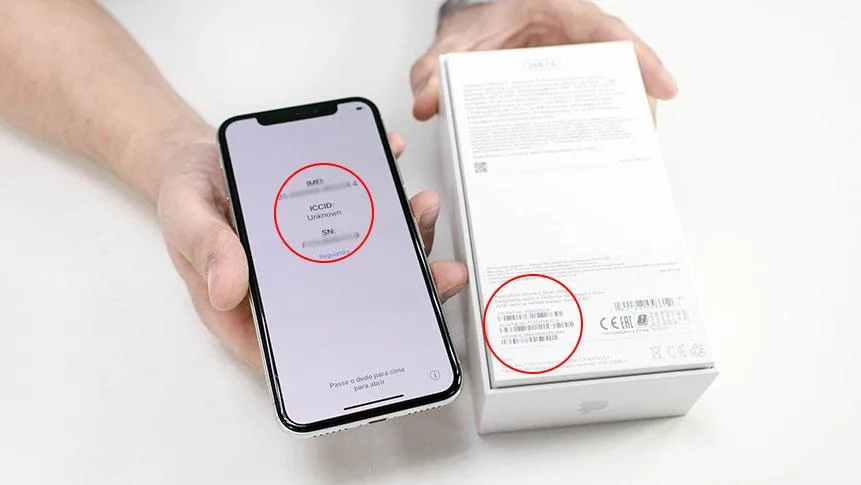
Where Can You Find an iPhone IMEI?
You should ideally record your IMEI before you ever lose your phone.
There are several places where you may be able to find it.
Check the iPhone settings
If the iPhone is still in your possession, open:
Settings → General → About
You should find the IMEI and other device information in the About section.
Writing the number down or storing it securely can save time if you ever need to report the device.
Check the original box
The packaging that came with an iPhone can contain identifying information for the device.
If your phone is missing, the original box can therefore be a useful source for finding the IMEI.
Check purchase documentation
Depending on where you purchased the iPhone, your invoice, receipt, or other purchase records may contain device identification details.
Keeping these records is particularly useful when dealing with insurance claims, police reports, carriers, or resale verification.
Can an Online IMEI Tracker Free Service Locate an iPhone?
This is where expectations need to be realistic.
Searching for an online IMEI tracker free service can produce many results. However, a free IMEI lookup and an actual phone-location service are two completely different things.
A legitimate lookup service may be designed to check information such as:
- Device model
- IMEI validity
- Certain blacklist information
- Device status
- Manufacturer-related information
- Lost or stolen status where supported
The information available depends on the service and its data sources.
What it should not automatically be assumed to provide is a live GPS location.
Be careful with exaggerated claims
Imagine a website says:
"Enter any iPhone IMEI and see its exact location instantly."
That should immediately raise questions.
Ask yourself:
- Where does the location data come from?
- Does the service have legitimate access to the relevant network information?
- Does it explain its limitations?
- Is it asking for your Apple Account password?
- Is it requesting a verification code?
- Does it demand payment before showing basic information?
Never give an unknown website your Apple Account password, two-factor authentication code, iPhone passcode, or other sensitive credentials simply because it claims to offer IMEI tracking.
How Does IMEI Help When an iPhone Is Stolen?
The IMEI becomes much more useful when the situation moves from "Where is my phone?" to "How do I report and identify my phone?"
For example, imagine your iPhone is stolen while you are travelling.
You may not be able to personally locate it using the IMEI. However, the number can help you identify the exact handset when communicating with your carrier, police, insurer, or an official device-registration system.
Give the IMEI to the police
When making a theft report, provide as much information as possible.
Useful details can include:
- IMEI
- Serial number
- iPhone model
- Phone number
- Purchase receipt
- Approximate theft location
- Date and time of the incident
- Device color and storage capacity
The more accurately you can identify the handset, the easier it is to distinguish it from other similar devices.
Contact your mobile carrier
Tell your carrier that the iPhone has been lost or stolen.
The carrier can explain what account and network measures are available. Depending on the country and network, an operator may also have procedures for handling stolen devices using their identifiers.
Use official blocking systems where available
In India, the Central Equipment Identity Register (CEIR) provides an official system for dealing with lost or stolen mobile devices.
CEIR allows eligible users to submit an IMEI-based request to block a lost or stolen handset. This is fundamentally different from a consumer GPS tracking website: the objective is to prevent the device from continuing to operate on participating mobile networks.
CEIR also provides an option for checking the genuineness or status of a mobile handset.
That makes an IMEI useful even when it cannot personally show you the phone's location.
A Practical Example: You Lost Your iPhone in a Taxi
Let's look at a realistic situation.
You leave a taxi and realize ten minutes later that your iPhone is missing. You remember that you saved the IMEI somewhere, so your first instinct is to search for an IMEI tracker.
That's not the best first move.
Instead, work through the following sequence:
- Open Find My from another trusted device.
- Select the missing iPhone.
- Check whether a location is available.
- Play a sound if you think the phone is nearby.
- Enable Lost Mode if the device is not in your possession.
- Contact the taxi company or driver if appropriate.
- Contact your mobile carrier.
- Report the theft if you believe the phone was stolen.
- Give the IMEI and serial number to the relevant authorities.
- Use the official device-blocking process available in your country.
This approach uses the IMEI where it is actually useful instead of treating it as a substitute for Apple's location service.
What Does "Track IMEI Number" Actually Mean?
The phrase track IMEI number can be misleading because people use it to describe several different activities.
For one person, it may mean:
"I lost my iPhone. How can I find it?"
For another, it could mean:
"I bought a used iPhone. How can I check whether it is legitimate?"
Someone else may simply want to know:
"What phone does this IMEI belong to?"
These are three different problems.
An IMEI lookup can be appropriate for device verification. An official blocking system can be appropriate after theft. Find My is generally the more relevant solution when the goal is locating your own Apple device.
Understanding that distinction helps you avoid wasting money on services that promise something they cannot actually deliver.
Can IMEI Tracking Help When Buying a Used iPhone?Yes, this is one of the more practical uses of IMEI-related services.
Before purchasing a used iPhone, don't rely only on the seller's word that the phone is clean.
Check the device carefully.
Important checks before paying
- Compare the IMEI with the device's records.
- Check whether the device has been reported or blacklisted where applicable.
- Confirm that the phone isn't associated with someone else's account.
- Check that Activation Lock isn't preventing legitimate setup.
- Verify the advertised model and storage capacity.
- Test cellular connectivity.
- Inspect the physical condition.
- Ask for proof of purchase when appropriate.
- Make sure the seller can properly transfer the device to you.
A five-minute check can prevent a much bigger problem later.
For example, someone may sell an iPhone at a surprisingly low price and say, "The phone works perfectly."
But if the device has a problematic status or cannot be properly activated by the new owner, the low price isn't really a bargain.
Can Someone Track You Just by Knowing Your IMEI?
Generally, knowing someone's IMEI does not give an ordinary person a public window into that person's movements.
The IMEI is an identifier associated with the device. It isn't a publicly accessible GPS location feed.
That doesn't mean you should share your IMEI carelessly.
Treat it as device information that should only be provided when there is a legitimate reason. Be particularly careful if someone asks for your IMEI together with account passwords, verification codes, or other credentials.
An IMEI number should not be confused with access to your Apple Account.
What If Find My Was Disabled Before the iPhone Was Lost?
This is one of the hardest situations because the most useful consumer location feature may not be available.
If Find My wasn't enabled before the device disappeared, you generally cannot turn it on remotely afterward.
In that case, focus on identification, account security, carrier support, reporting, and official blocking options.
Your next steps should include:
- Contacting your carrier
- Reporting the missing device
- Keeping your IMEI and serial number ready
- Reviewing your Apple Account security
- Changing credentials when necessary
- Using an official blocking system if available
- Keeping your purchase records
This is also why enabling Find My before a phone goes missing is far more valuable than searching for a tracking website afterward.
Common Mistakes People Make With IMEI Tracking
Many lost-phone situations become harder because people take the wrong first steps.
Mistake 1: Assuming the IMEI is GPS
An IMEI identifies a device. It isn't the same thing as a GPS location.
Mistake 2: Trusting every "free tracker"
A website being free doesn't automatically make it legitimate or capable of providing live tracking.
Mistake 3: Giving away Apple credentials
Never hand over your Apple Account password or verification code to an unknown tracking service.
Mistake 4: Removing the stolen iPhone from Find My
If the device is stolen, don't remove it from your account simply because someone sends you a message asking you to do so.
Account and Activation Lock protections can be important in preventing unauthorized reuse of the device.
Mistake 5: Trying to recover a stolen phone alone
Even if you have a location, personal confrontation is a bad idea. Let law enforcement handle potentially dangerous recovery situations.
Final Answer: Does an IMEI Tracker Really Locate an iPhone?
An IMEI is useful, but it isn't a magic phone locator.
If you're looking for a tool where you enter an iPhone's IMEI and immediately receive its exact live GPS position, you should not assume that such a service is legitimate simply because a website makes that claim.
The IMEI's real value is different. It provides a unique identity for the handset and can support reporting, device verification, carrier procedures, network blocking, and official investigations.
For locating your own lost iPhone, use Find My first.
For a stolen device, combine Find My with your carrier, police reporting, and the appropriate official IMEI-based blocking process.
For a used iPhone, an IMEI check can help you investigate the device before buying it.
The key is to match the tool to the problem:
Find My → locating and protecting your iPhone
IMEI → identifying and reporting the device
Carrier/official systems → network and blocking actions
That distinction is much more useful than simply searching for the biggest "IMEI tracker" claim on the internet.
Frequently Asked Questions
What is an IMEI tracker?
An IMEI tracker is generally a service or tool associated with checking information connected to a device's IMEI. It should not automatically be interpreted as a live GPS tracking system. For a lost iPhone, Apple's Find My feature is the more appropriate option for locating the device when it was enabled beforehand.
How to track an iPhone using an IMEI number?
You generally cannot see an iPhone's live location simply by entering its IMEI into a public website. Instead, use Find My to locate your own device. If the iPhone has been stolen, give its IMEI to your carrier and authorities and use any official blocking service available in your country.
What is the best way to find a lost iPhone?
The most practical first step is Find My. Check the available location, play a sound if the phone may be nearby, and activate Lost Mode when necessary. If you believe the iPhone was stolen, contact the appropriate authorities rather than attempting to recover it yourself. Keep the IMEI available for reporting and device identification.