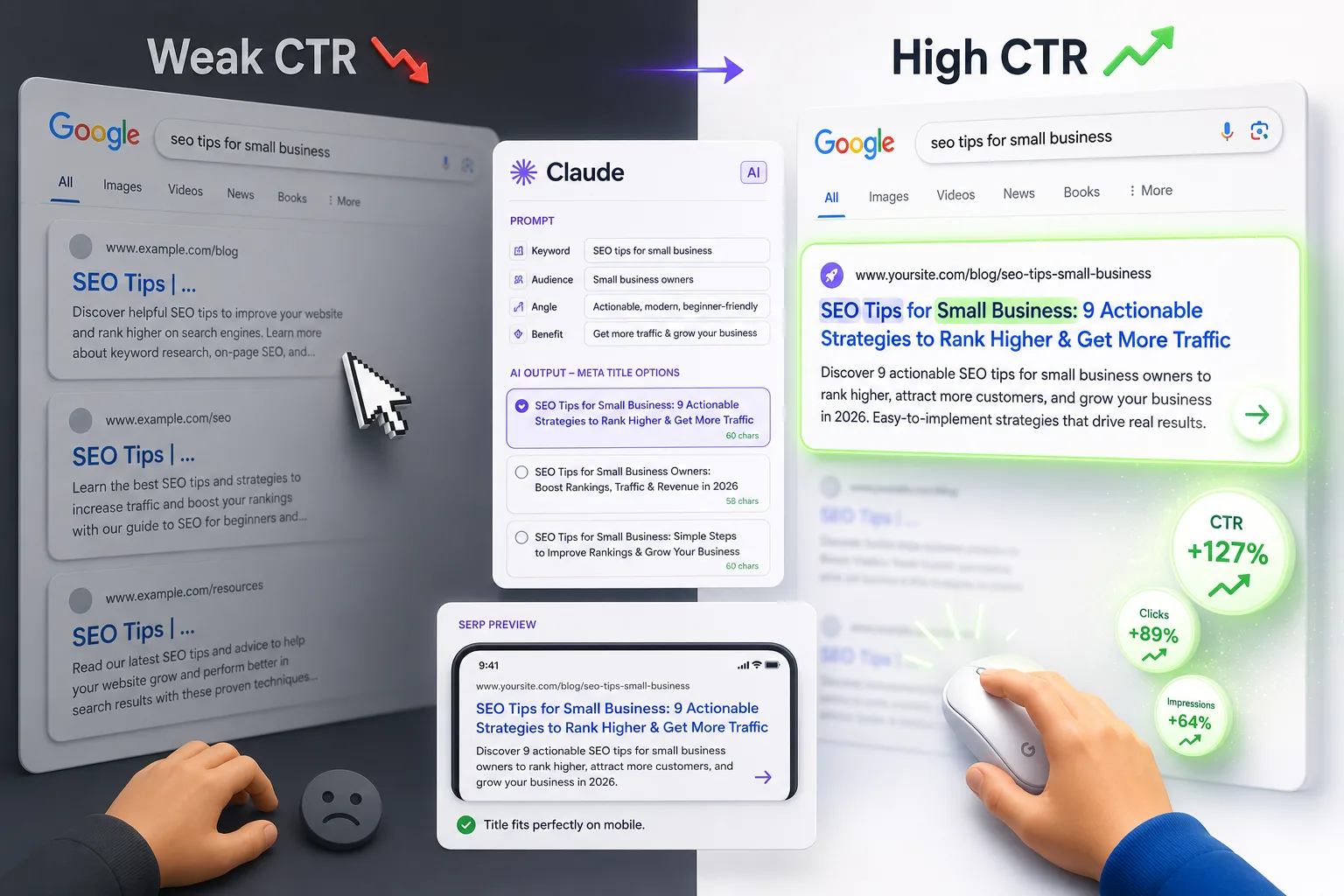
Meta titles and descriptions are the first thing a searcher sees. Before they read your content, before they see your design, before they know anything about your brand — they read 60 characters of title and 160 characters of description and decide whether to click.
Most websites treat this as an afterthought. That is a mistake that costs clicks silently, every single day.
This guide covers exactly what makes meta tags work in 2026, the most common errors that kill click-through rates, and how to use AI tools like Claude to produce better meta tags faster — without losing the strategic thinking that makes them actually perform.
Why Meta Tags Still Matter in 2026
With AI Overviews absorbing clicks on informational queries, some marketers have started questioning whether meta tags are worth the effort. They are — for two important reasons.
First, they directly influence click-through rate on all non-AI-absorbed queries. For commercial, transactional, and many navigational queries, the traditional blue-link SERP is still very much alive. Your meta title and description are your ad copy in that environment. A weak title on a page ranking in position 3 can lose clicks to a better-written page in position 5.
Second, a well-matched meta description reduces Google's rewriting rate. Google rewrites meta descriptions roughly 60–70% of the time when it decides yours doesn't match the search intent well enough. A description that closely mirrors what your page actually delivers — in language that matches how your audience searches — has a much better chance of surviving as written. That matters because your description, not Google's rewrite, is the one you tested and optimized.
The Anatomy of a High-Performing Meta Title
A meta title that earns clicks does five things:
1. Leads with the target keyword Google bolds matching keywords in search results. When your keyword appears near the start of the title, it catches the eye faster and signals relevance immediately. A title that buries the keyword in the middle or end loses that visual advantage.
2. Stays under 60 characters Google measures pixel width, not characters — but 60 characters is a reliable safe limit for most title structures. Titles that run long get truncated with an ellipsis, which cuts off your message mid-sentence and looks unfinished in the SERP.
3. Communicates a specific benefit or outcome Generic titles like "Complete Guide to Email Marketing" tell the reader what the topic is but not why they should click. Specific titles like "Email Marketing for SaaS: How to Reduce Churn with Onboarding Sequences" tell them exactly what they will get. Specificity earns clicks.
4. Matches the search intent precisely A title that signals informational content ("How to...") will attract a different reader than one that signals commercial intent ("Best... for...") or transactional intent ("Buy... Online"). Mismatching intent and title creates high bounce rates even when you earn the click.
5. Differentiates from competing titles Open your target keyword in a private browser and read the titles of the top five results. If your title looks and sounds like theirs, there is no reason for a searcher to choose yours. Find the angle, the audience, the specificity, or the format that sets your result apart.
The Anatomy of a High-Performing Meta Description
The description has a different job than the title. The title earns attention. The description earns the click.
Lead with the most important information Many descriptions open with filler phrases like "In this article, we will explore..." or "This post covers..." These waste the first 30–40 characters on content that adds no value. Lead with the answer or the benefit instead. "Learn how to..." or "Find out why..." with the key point immediately following.
Include the target keyword naturally Google bolds the query match in descriptions the same way it does in titles. A natural keyword inclusion helps the description stand out visually and reinforces relevance at a glance.
End with a clear directional signal Not every description needs a hard call-to-action, but it should give the reader a reason to act. Phrases like "See the full breakdown," "Find out which is right for you," or "Start with step one" create forward momentum without sounding like ad copy.
Stay between 140 and 160 characters Below 140 characters, your description often gets padded by Google with content pulled from the page — which may not be the messaging you want. Above 160, it gets truncated. The sweet spot gives you enough space to be specific and compelling without getting cut off.
Be accurate about what the page delivers The biggest mistake in meta descriptions is overselling. A description that promises more than the page delivers creates a high bounce rate, which signals to Google that the result wasn't satisfying — a negative quality signal over time. Match the description to the actual content.
The 7 Most Common Meta Tag Mistakes (And How to Fix Them)
1. Duplicate meta titles across multiple pages
This is one of the most widespread issues in site audits. When multiple pages share the same title, search engines cannot differentiate between them and users cannot either. Every page needs a unique title that reflects its specific content and target keyword.
Fix: Audit your titles with a crawl tool. Any duplicates need to be rewritten with page-specific keywords and angles.
2. Title truncation from exceeding the character limit
A title that reads "The Complete and Comprehensive Guide to Social Media Marketing Strategy for Small Business Owners" is not a title — it is a sentence that gets sliced in half in the SERP.
Fix: Aim for 55–58 characters as your working limit, not 60. The buffer matters because wide characters (W, M, uppercase letters) consume more pixel space than narrow ones.
3. Missing meta descriptions (relying on Google to generate them)
When no description is provided, Google pulls text from the page — usually whatever appears near the search query match, regardless of whether it makes sense out of context. This produces awkward, fragmentary descriptions that rarely communicate value.
Fix: Write a description for every indexed page. Even a decent custom description almost always outperforms an auto-generated one on click-through rate.
4. Keyword stuffing in the title
"SEO Services | Best SEO Agency | SEO Consultant | SEO Experts" looks spammy to users and does not earn clicks. More importantly, it provides no information about what differentiates the page.
Fix: Use one primary keyword, include it naturally, and let the rest of the title do the job of communicating value.
5. Generic descriptions that could apply to any page
"We offer high-quality services with excellent customer support. Contact us today to learn more." This description could be on ten thousand websites. It says nothing specific and gives no reason to click this result over any other.
Fix: Every description should contain at least one specific detail — a number, an outcome, a named feature, a specific audience — that could only apply to this page.
6. Mismatched intent between title and page content
A title written for informational intent ("How to Choose the Right CRM") on a page that is actually a sales page creates a mismatch. The user clicks expecting guidance and lands on a product pitch. Bounce rate spikes, quality signals decline.
Fix: Match your title and description to the actual intent and content of the page. If the page sells, the title should reflect that. If it educates, the title should reflect that.
7. Never testing or updating meta tags
Meta tags are often written once at publication and never revisited. But search behavior changes, competitors update their titles, and click-through benchmarks shift over time.
Fix: Review your meta tags on high-impression, low-CTR pages in Google Search Console every quarter. These are pages that are being seen but not clicked — and better meta tags are often the fastest fix.
How to Use AI to Write Better Meta Tags
AI tools have changed the practical workflow for meta tag writing significantly. What used to take careful manual effort — drafting multiple variations, checking character counts, testing different angles — can now be done in minutes with the right prompts.
Claude, in particular, handles meta tag tasks well. It respects tight character limits, avoids inflated language, and can produce multiple distinct variations from a single well-structured prompt. The key word there is "well-structured." A vague prompt like "write a meta title for my SEO page" produces generic output. A prompt that includes the target keyword, the page's specific angle, the intended audience, and what makes the page different from competing results produces something you can actually use.
The prompt structure that consistently produces the best output follows this pattern:
- State the page type (blog post, product page, service page, etc.)
- Provide the target keyword
- Describe the audience in one sentence
- State the main benefit or outcome the page delivers
- Specify the character limit and ask for multiple options
When Claude has all five of those inputs, the output quality improves dramatically compared to an open-ended request. You are giving it constraints and context simultaneously — which is exactly what produces tight, purposeful writing.
For a complete library of copy-paste Claude prompts covering every page type — blog posts, product pages, service pages, local pages, bulk rewrites, CTR fixes, and more — the Visiblytics guide on Claude AI prompts for SEO meta titles and descriptions contains 30 tested prompts organized by use case, ready to use immediately.
The Verification Step Most People Skip
Generating a good meta title with AI is only half the workflow. The other half is verifying how it actually renders in a search result before publishing.
Character count is not the same as pixel width. A 58-character title packed with capital letters and wide characters like W and M can still truncate in the SERP. The only reliable way to check is to paste your title into a visual SERP previewer that renders it as Google would display it.
This single step — pasting your title into a preview tool before publishing — catches the truncation issues that character counting misses. It takes thirty seconds and saves you from publishing a title that gets cut off mid-word in every search result it appears in.
The same verification applies to descriptions. Paste the description into a previewer and check whether it renders within the visible area on both desktop and mobile. Mobile displays slightly less text, and a description that fits fine on desktop may get cut on mobile.
A Practical Meta Tag Workflow for 2026
Here is the full workflow, from blank page to published meta tag, that combines strategic thinking with AI efficiency:
Step 1: Identify the primary keyword and search intent Before writing anything, confirm what your page is actually optimized for and what the searcher wants when they use that query. The intent (informational, commercial, transactional, navigational) shapes every decision that follows.
Step 2: Audit the competing titles in the SERP Open your target keyword in a private browser. Read the titles of the top five results. Note what they have in common and where they are all similar — that similarity is the gap you can differentiate against.
Step 3: Identify your specific angle What does your page offer that the competing results do not? A specific audience, a unique format, a more detailed answer, a different perspective? That differentiator should be reflected in your title or description.
Step 4: Use a structured AI prompt to generate options With your keyword, audience, angle, and intent defined, write a prompt that includes all of that context. Ask for three to five variations. Do not publish the first option — compare the variations and identify which one best reflects the page's actual content and competitive positioning.
Step 5: Verify rendering in a SERP previewer Paste your chosen title and description into a visual previewer. Confirm that nothing is truncated. Adjust if needed.
Step 6: Publish and track CTR in Search Console After publishing, monitor the page's click-through rate in Google Search Console over the following four to six weeks. If CTR is below the average for its ranking position, treat it as a candidate for a meta tag rewrite.
When to Prioritize Meta Tag Rewrites
Not every page needs attention at once. These are the highest-priority candidates for meta tag optimization:
Pages with high impressions and low CTR in Search Console. These pages are appearing in searches but not getting clicked. The content is indexed and the keyword is being matched — the problem is in the presentation. Better meta tags are the first lever to pull.
Pages ranking in positions 4–10. Pages in these positions are visible but not dominant. A strong meta title that stands out from the top three results can earn disproportionate clicks relative to position.
Pages with truncated titles. If your title is being cut off in the SERP, you are losing control of your message at the most critical moment. Fix truncation first — it is the most basic and most correctable problem.
Pages with missing or auto-generated descriptions. Any page relying on Google to write its description is leaving click-through rate on the table. Custom descriptions consistently outperform auto-generated ones.
High-value commercial pages. Service pages, product pages, and pricing pages are where clicks translate directly to revenue. These deserve the most careful meta tag attention, the most testing, and the most frequent review.
Frequently Asked Questions
Does the meta description affect Google rankings?
No, meta descriptions are not a direct ranking factor. Google has confirmed this. However, they have a significant indirect effect: a compelling description improves click-through rate, and consistently strong CTR is a quality signal that correlates with ranking stability over time.
Should I include my brand name in the meta title?
For most pages, Google appends your brand name automatically after the title separator in search results. Including it in your title text typically wastes character space that could be used for your keyword or a benefit statement. The exception is your homepage, where brand recognition is the primary goal.
How often should I rewrite meta tags?
Review high-impression, low-CTR pages quarterly. For stable pages with strong CTR, annual reviews are sufficient. Rewrite whenever competitors update their titles significantly, when your page content changes, or when CTR drops noticeably without a corresponding ranking change.
Can I use the same meta description on multiple pages?
No. Duplicate descriptions create the same problem as duplicate titles — they prevent differentiation between pages and are flagged as issues in standard SEO audits. Every page needs a unique description that reflects its specific content.
What is the difference between a meta title and an H1 heading?
The meta title appears in the browser tab and search results. The H1 appears on the page itself. They do not need to be identical, and often should not be. The meta title is constrained by character limits and needs to work as standalone ad copy in the SERP. The H1 can be longer, more descriptive, and optimized for the reader already on the page. Aligning them in topic and intent is important; matching them word-for-word is not required.