Creating a 3D model is an important part of the architectural design process, but presenting that model in a realistic and engaging way can take additional time. SketchUp AI is changing this workflow by helping designers transform basic 3D concepts into more detailed and visually impressive designs.
By combining the flexibility of SketchUp with artificial intelligence, architects, interior designers, and other creative professionals can explore ideas faster, experiment with different styles, and create realistic visual concepts without relying entirely on traditional rendering methods.
What Is SketchUp AI?
SketchUp AI uses artificial intelligence to enhance how designs are visualized and integrated into the creative workflow around SketchUp models. AI can help designers create realistic appearances, play with materials, affect lighting, and try out other designs.
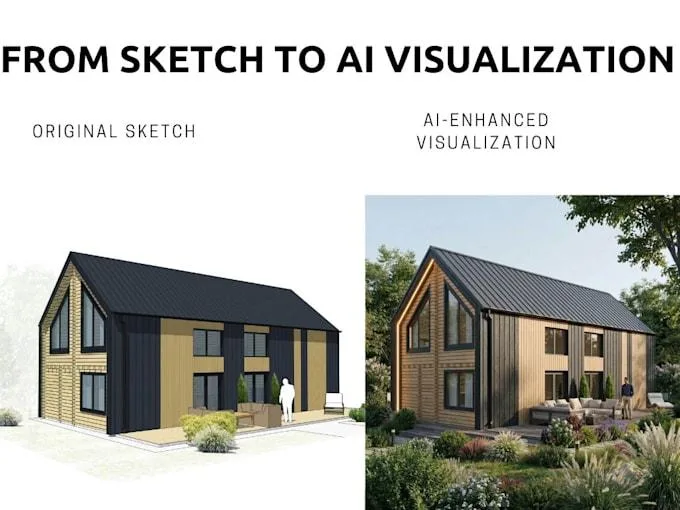
The basic 3D model has the outline of a building or room, but AI can augment that outlet with more depth. This simplifies pitching ideas to customers and assessing design options.
This technology is particularly beneficial in a project that is still concept as designers need to test multiple alternatives rapidly.
From 3D Models to Realistic Concepts
SketchUp is relatively easy software when it comes to 3D modeling. A model that is simple may not indicate what the final project will look like.
Using close to a real-life scenario, designers can take visualisation design options for furniture and explore their finishes, colours, surrounding environments such as landscaping objects or even road designs with AI. It establishes a tighter relationship between the initial 3d model and the final design intention.
An example is where the visualization of a simple residential building made with different facade materials, roof styles, windows, gardens and lighting conditions. Designers can weigh these options prior to making key decisions about a project.
Save Time on Design Exploration
Love it or hate it, architectural projects are rarely without revisions. However, having to manually change a design and render an image for every single idea becomes tedious.
SketchUp AI can apply smarter design exploration to only get you quicker visual translations of designs. Rather than spending hours building out every iteration on their own, designers can quickly generate a few concepts and discover what direction might be worth following.
It can come in very handy at the initial stages of a project when ideas are floating around and client feedback is likely to cause many iterations.
Improve Presentations for Clients
A realistic image is more effective than a basic set of diagrams or even model in explaining an architectural idea. Having a concept that looks like it will really exists is one of your main goals. Clients may be prepared to envisage the look and feel of the 3D model data in SketchUp but having visualized realistic materials, lighting and environment the concept is all more easy to picture.
AI visualization provides designers with another way to show their work. Rather than verbalize how a building may appear when finished, they are able to display visual ideas that convey the desired feeling or impression.
Higher quality images can lead to more efficient meetings and allow clients to give clearer feedback.
Applications of SketchUp AI
AI-assisted SketchUp workflows can be useful across different types of design projects, including:
- Residential architecture
- Commercial buildings
- Interior design
- Landscape concepts
- Property development
- Renovation projects
- Real estate visualization
- Conceptual architecture
From a small room renovation to a large commercial development, AI can help designers explore visual possibilities at different stages of a project.
Using AI Render Studio for Design Visualization
AI Render Studio is an AI image rendering application that helps happiness working professionals to create more realistic architectural and designed images quickly.
It can aid users in transforming design ideas into attractive visuals while lessening some of the redundant tasks that often come with traditional rendering. AI visualization allows architects and designers to see how things will look, communicate ideas more effectively and prepare great presentations for projects in the beginning phase.
This kind of workflow allows for users of SketchUp to merge the precision found in 3D modeling with the quick nature and flexibility that AI-powered visualization can bring.
AI as a Creative Design Assistant
An architect or designer should never be replaced by artificial intelligence, but leveraging the knowledge and creativity of an AI still counts. Instead, it can act as a creative assistant to aid professionals in exploring a wider range of options faster.
AI is great for visual experimentation and visual presentation, but designers are still in charge of the project ideas and practical needs. Such a balance enables the generation of design decisions with a focus on the most important decisions and using tech to move secondary tasks.
The Future of SketchUp AI
With the development of artificial intelligence, we expect that its role in 3D design and architectural visualization will expand. Thus in the coming future, AI deep tools might give us even more control about materials, environments, designs and variations.
If you are already a working professional using SketchUp, AI provides an avenue to improve upon existing workflows instead of replacing them entirely. Using 3D modeling styles familiar to architects, coupled with intelligent visualization can bring flexibility and efficiency into the design process.
Conclusion
SketchUp AI is creating new possibilities for architects, designers, and visualization professionals. By combining 3D modeling with artificial intelligence, users can explore design ideas faster, create realistic concepts, and communicate their vision more effectively.
Airender.studio makes it easier to bring creative concepts into realistic visual form, helping professionals spend less time on repetitive rendering tasks and more time developing better designs.